> ## Documentation Index
> Fetch the complete documentation index at: https://docs.uflo.io/llms.txt
> Use this file to discover all available pages before exploring further.
# Introduction
> Overview of Uflo's AI-powered exam grading workflow
## Uflo’s AI Grader
Uflo is an AI-powered educational ecosystem that automates grading of handwritten and typed responses with high accuracy and consistency.
Following these best practices from the start will save time, reduce scanning errors, and ensure Uflo's automated grading accurately identifies and evaluates each student's responses. Use the [Exam Grading Checklist](/instructors/grading/exam-grading-checklist) to track your progress through each phase.
**Who This Guide Is For**
This guide is for educators new to Uflo who are grading pen-and-paper or digital exams with free response questions. No prior experience with Uflo or auto-grading tools is required.
## Benefits of Grading With Uflo
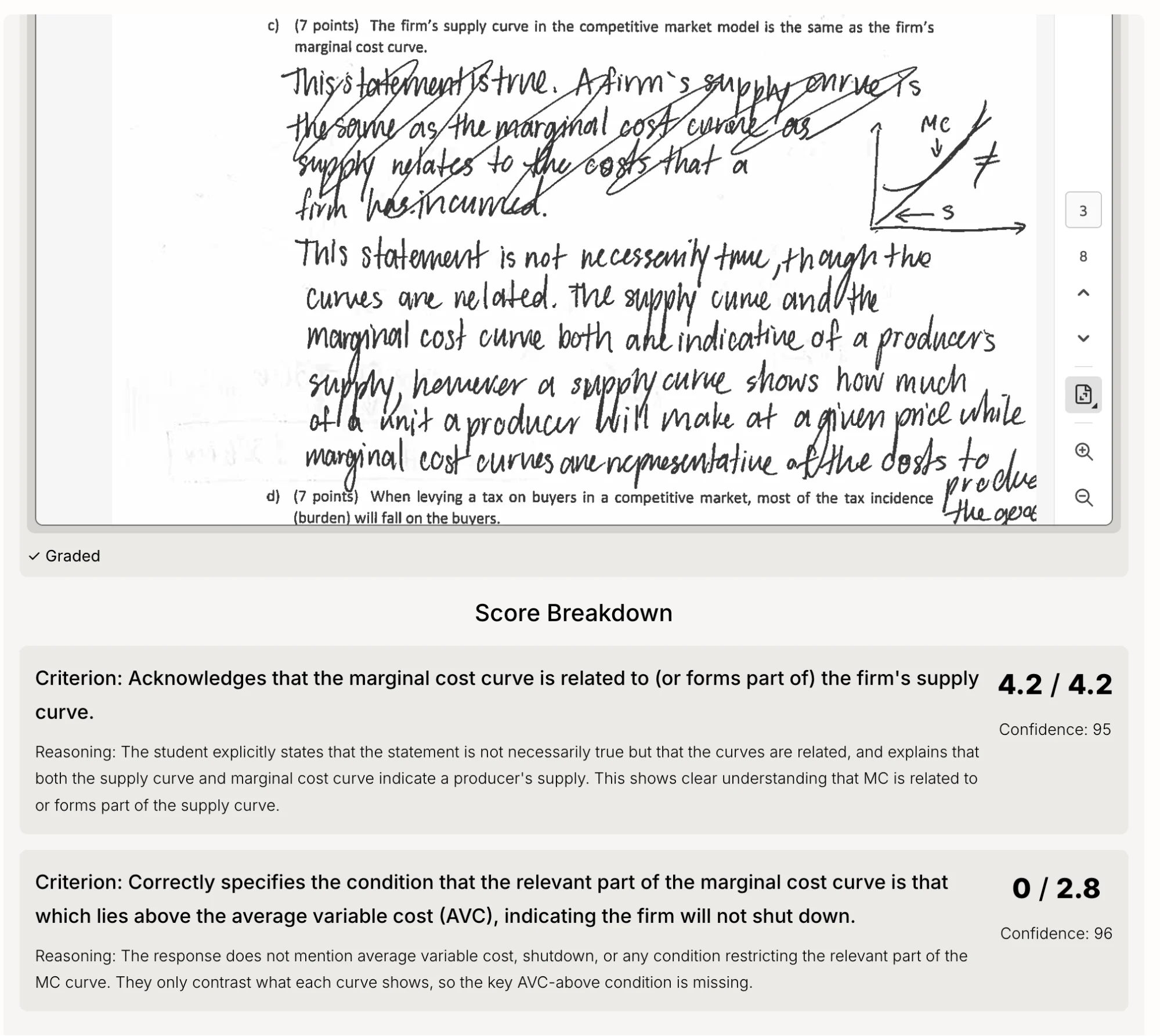
Uflo combines state-of-the-art AI with deep educational expertise across multiple disciplines to grade complex free response questions—digital or handwritten—with extremely high accuracy.
More importantly, Uflo backs every grade with detailed feedback for both instructors and students during the review phase. Students can use this feedback to request regrades from their instructors, ensuring humans remain in the loop.
As a result of using Uflo, educators can expect:
Reduction in grading time
Grading accuracy on short answer questions
Grading variance across multiple rounds
Detailed feedback for every student on every question
## Is Uflo the Right Fit?
Uflo's AI grading is highly accurate, but like any grading method, it is not perfect. Before committing to AI-assisted grading, make sure you understand the limitations:
AI grading requires an instructor/TA review step. If you cannot dedicate time to [review a sample of graded responses](/instructors/grading/grading-the-exam#phase-4-3-reviewing-results) before releasing scores, consider using multiple choice or auto-scored question types that do not require review.
No grading method, human or AI, produces zero errors. Human graders introduce inconsistencies, fatigue-related mistakes, and subjective drift across hundreds of responses. Uflo's AI grading is more consistent than human grading, but a small number of responses may still need correction. The [review and regrade workflow](/instructors/grading/rubric-refinement) is designed to catch and fix these efficiently.
Students will occasionally find grading issues. This happens with human-graded exams too. Uflo's [regrade request system](/instructors/grading/after-grading) gives students a structured way to flag concerns and gives you a clear workflow to address them.
There is a learning curve to Uflo's AI grading system. The first time you grade with Uflo, you should expect a 3-day turnaround time. Every subsequent attempt should be quicker, typically within 24 hours. The intended workflow is: grade, review a sample, [refine the rubric](/instructors/grading/rubric-refinement) if needed, and regrade.
Uflo's AI grading has a variance of approximately 2% across multiple grading rounds. This means that when a quest ion is regraded, individual scores may shift slightly, for example, a student might gain or lose half a point, even if the rubric did not change. This is normal and equivalent to asking a different human grader to re-evaluate the same response. If a rubric change improved accuracy overall, small fluctuations on individual submissions are expected and do not indicate a problem.
 ## How It Works
Uflo’s grading process has five phases. The first two must be completed before the exam is administered.
Design your exam and upload the blank exam template to stamp QR codes on each page. Complete before the exam is printed and distributed.
Upload your complete exam file (questions, solutions, and rubric) to configure Uflo's AI grading engine.
After steps 1 and 2, collect, unstaple, scan, and upload exams.
Review AI-generated grades and ask Uflo to regrade any problematic questions. Once satisfied, release the results to students.
Respond to student regrade requests and export results.
**Flexible Setup Order**
Steps 1 and 2 can be done in any order or at the same time. If your solutions or rubric aren't ready yet, complete Step 1 first to print the exam, then finish Step 2 before grading.
Design your exam and generate QR codes before printing.
## How It Works
Uflo’s grading process has five phases. The first two must be completed before the exam is administered.
Design your exam and upload the blank exam template to stamp QR codes on each page. Complete before the exam is printed and distributed.
Upload your complete exam file (questions, solutions, and rubric) to configure Uflo's AI grading engine.
After steps 1 and 2, collect, unstaple, scan, and upload exams.
Review AI-generated grades and ask Uflo to regrade any problematic questions. Once satisfied, release the results to students.
Respond to student regrade requests and export results.
**Flexible Setup Order**
Steps 1 and 2 can be done in any order or at the same time. If your solutions or rubric aren't ready yet, complete Step 1 first to print the exam, then finish Step 2 before grading.
Design your exam and generate QR codes before printing.